
Mining and Heavy Industry Commissioning Software
Standardize commissioning, track readiness by equipment and system, manage punch items, and build complete turnover records for mining and heavy industry projects


Trusted for Complex Commissioning Projects Around the World


Keep Mining and Heavy Industry Projects Moving Toward Startup
Mining and heavy industry commissioning involves thousands of equipment tags, multiple contractors, interdependent process systems, demanding safety requirements, and complex startup sequences. Bluerithm brings this work into one connected platform so teams can see what has been completed, what is blocking the next phase, and what must happen before systems are ready for dry commissioning, wet commissioning, startup, and ramp-up.
Track System Readiness
See completions and commissioning status across equipment, systems, process areas, disciplines, contractors, project phases, and turnover packages.
Standardize Field Execution
Give project teams consistent digital ITRs, inspection checklists, test procedures, completion certificates, and approval workflows.
Resolve Punch Items Faster
Connect deficiencies directly to equipment, systems, responsible parties, drawings, tests, photos, and supporting documentation.
Improve Turnover
Maintain organized commissioning records throughout the project instead of assembling thousands of pages during closeout.

One Platform for Mining and Heavy Industry Commissioning
Bluerithm gives project teams the tools to manage the entire completions and commissioning process—from project setup and equipment tracking through construction verification, mechanical completion, pre-commissioning, dry and wet commissioning, startup, performance testing, ramp-up, punch resolution, reporting, and final turnover.
Manage Equipment
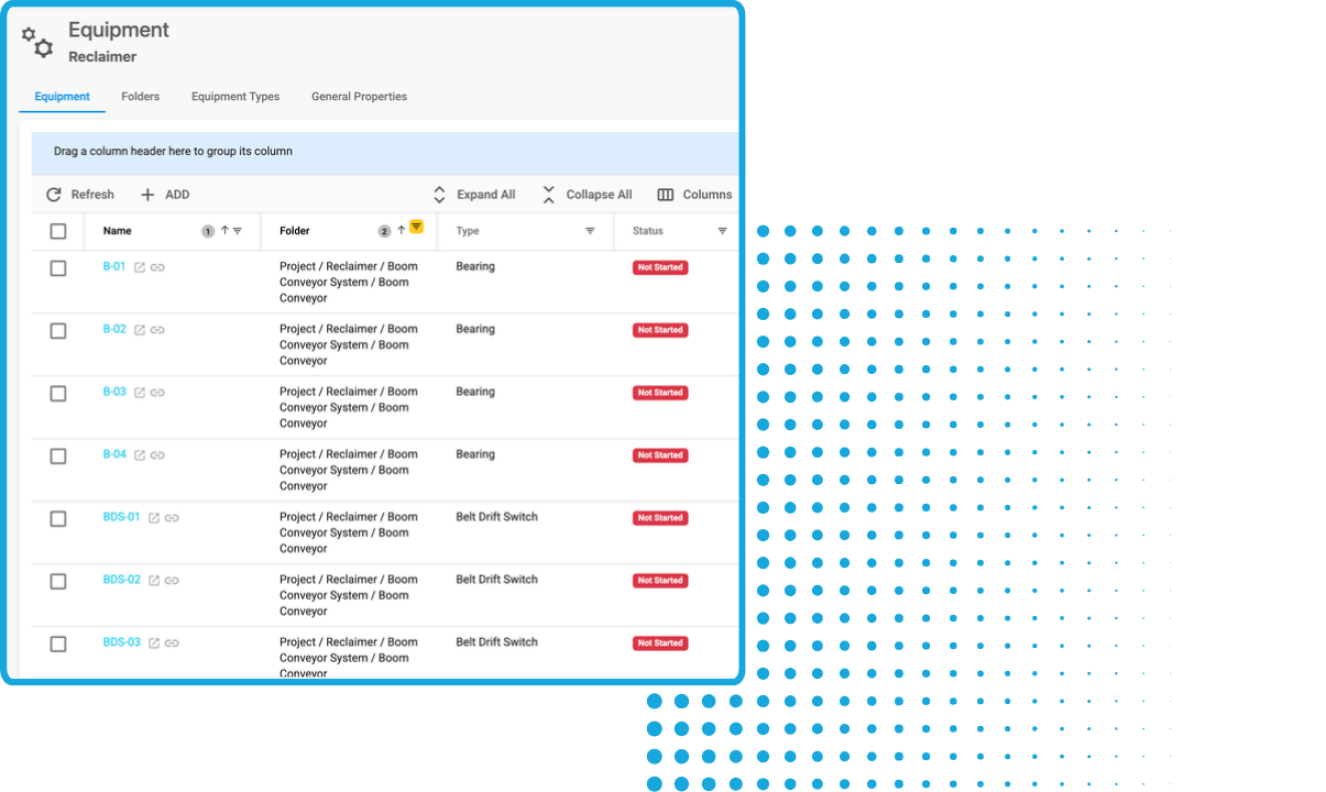
Create structured equipment registers and connect each tag to its inspections, ITRs, tests, punch items, documents, photos, responsibilities, and current status.
Digitize ITRs and Test Procedures
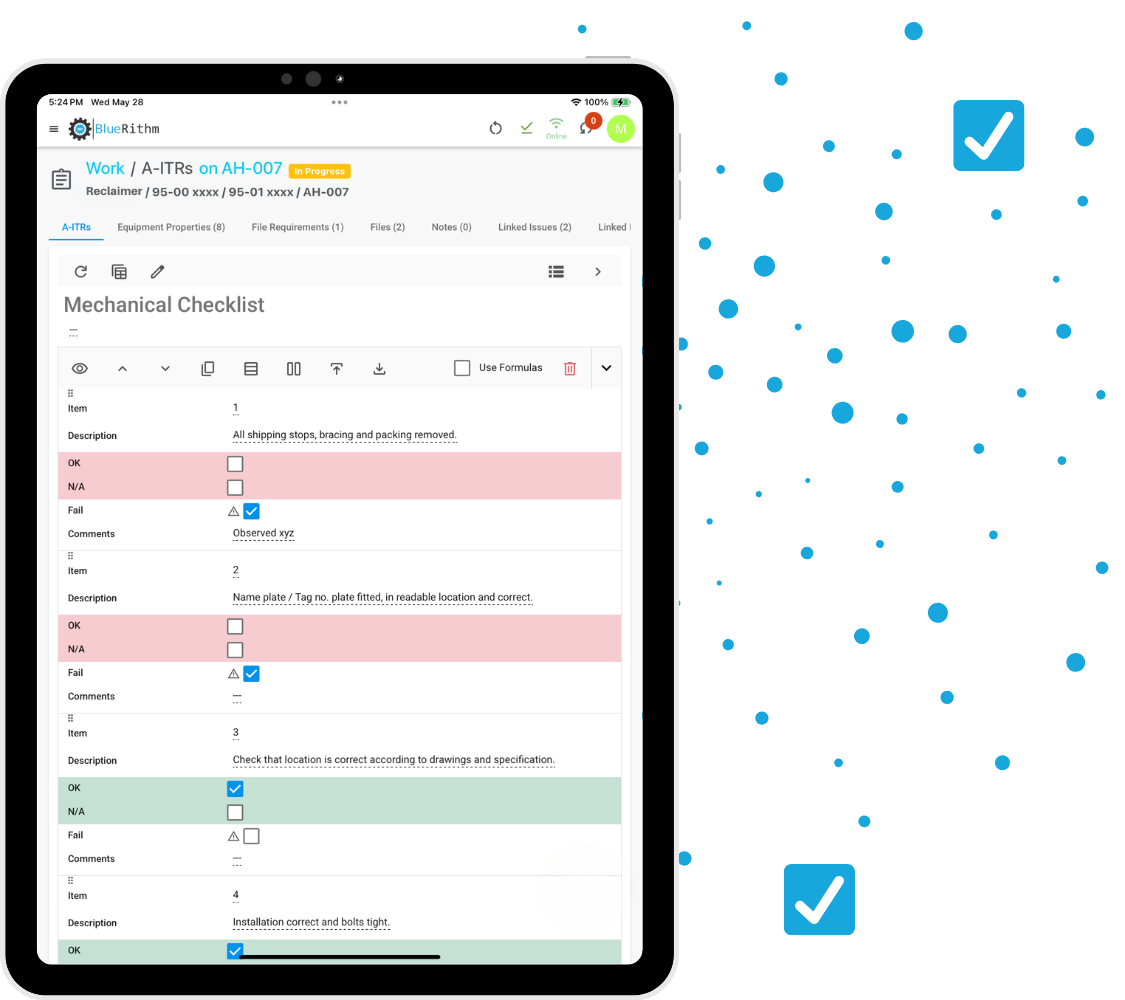
Complete construction inspections, mechanical completion checks, pre-commissioning activities, startup records, functional tests, and performance tests from phones, tablets, or computers.
Track Punch Items
Capture, categorize, assign, update, verify, and close punch items while maintaining a complete history of every item.
Monitor Readiness
Use dashboards to track tag completion, testing progress, open punch items, overdue work, milestones, and system readiness.
Generate Reports
Build progress, testing, punch, system-completion, startup, and final commissioning reports directly from current project data.
Work Anywhere
Give field teams access to their commissioning work on any device, including at remote mine sites and facilities where internet connectivity may be limited.
Configure Bluerithm Around Your Commissioning Process
No two mining or heavy industry projects have exactly the same equipment, process configuration, systemization strategy, testing requirements, startup sequence, or turnover standards. Bluerithm lets you configure project structures, equipment hierarchies, workflows, forms, responsibilities, dashboards, and reports around the way each project operates.
Flexible Project Structure
Organize commissioning information by site, mine, facility, process area, plant, unit, system, subsystem, equipment type, discipline, contractor, phase, or turnover package.
Custom Workflows
Create workflows for construction verification, mechanical completion, pre-commissioning, dry commissioning, wet commissioning, energization, startup, performance testing, ramp-up, punch resolution, approvals, and handover.
Reusable Templates
Standardize project structures, equipment types, ITRs, test procedures, workflows, dashboards, and reports across facilities and capital programs.
Built to Scale
Use Bluerithm for an individual plant expansion or a global portfolio involving thousands of equipment tags, users, tests, punch items, and commissioning records.

Turn Your Commissioning Standards Into Repeatable Templates
Build it once. Improve it over time. Use it again.
Create reusable templates for:
- Project structures and workflows
- Process areas, systems, and subsystems
- Equipment types and tag fields
- Inspection and test records
- Mechanical completion checklists
- Pre-commissioning procedures
- Dry and wet commissioning activities
- Startup and performance tests
- Punch and approval workflows
- Project and portfolio dashboards
- Progress and final reports
- Turnover documentation


Digitize ITRs and Test Procedures
Replace paper forms, spreadsheets, PDFs, and disconnected documents with digital commissioning workflows connected directly to equipment and systems.
Create everything from straightforward construction inspections to detailed startup and performance test procedures with conditional logic, equations, validation, attachments, signatures, automatic punch-item creation, and real-time completion tracking.
- Construction verification checklists
- Inspection and test records
- Mechanical completion certificates
- Conveyor alignment and rotation checks
- Pressure and leak test records
- Cleaning and flushing records
- Electrical testing records
- Calibration and loop-check forms
- Equipment startup records
- Dry commissioning procedures
- Wet commissioning procedures
- Functional and performance tests
- Controls and alarm verification
- Site observation forms
- Custom approval and sign-off workflows
Keep Equipment at the Center of Commissioning
Connect every completions and commissioning activity to the equipment and systems being inspected or tested.
Import tag registers, organize large quantities of assets, and associate each item with its forms, tests, punch items, documents, photos, responsibilities, and current commissioning status.
- Create structured equipment registers
- Import thousands of equipment records
- Organize assets by process area, system, subsystem, location, type, discipline, or phase
- Apply ITRs and tests in bulk
- Assign contractor, supplier, and vendor responsibilities
- Track status at the tag, subsystem, system, and plant-area levels
- Maintain a complete commissioning history for every asset


Capture and Resolve Punch Items Faster
Manage deficiencies, incomplete work, failed tests, damaged equipment, missing documentation, and retesting requirements from identification through resolution.
Field users can create punch items directly from phones or tablets and include photos, descriptions, categories, priorities, assignments, due dates, comments, and supporting documentation.
- Maintain a centralized punch list
- Use category A, B, and C classifications or your own system
- Assign responsibility and due dates
- Connect punch items to equipment and systems
- Create punch items directly from ITRs and tests
- Track corrective work, retesting, and verification
- Preserve a complete activity history
- Monitor open and closed items on dashboards
- Generate current punch-list reports
Connect Punch Items and Equipment to Project Drawings
Use PDF markups and pins to connect equipment, punch items, commissioning work, and project information directly to plot plans, P&IDs, single-line diagrams, schematics, equipment layouts, process flow diagrams, and construction documents.
Teams can quickly identify where equipment or a punch item is located while keeping that information connected to the complete commissioning record.


Keep Commissioning Meetings Connected to the Project
Plan and document completions, commissioning, startup, and coordination meetings inside Bluerithm so agendas, decisions, attendees, and follow-up actions remain connected to current project information.
- Create and manage meeting agendas
- Record attendees and participation
- Capture meeting notes and decisions
- Assign follow-up actions
- Track unresolved action items
- Connect discussions to current project issues
- Maintain an organized meeting history
See Commissioning Readiness in Real Time
Bluerithm dashboards turn live project data into a clear view of completions progress, testing readiness, outstanding punch items, and areas requiring attention.
Create dashboards for individual mines, plants, process areas, systems, project phases, contractors, or entire capital programs.
Track metrics including:
- Equipment and tag completion
- ITR and test progress
- Mechanical completion status
- Systems ready for pre-commissioning
- Systems ready for dry commissioning
- Systems ready for wet commissioning
- Systems ready for startup
- Open and closed punch items
- Punch items by category or responsible party
- Overdue work
- Testing and retesting status
- Milestones and turnover readiness
- Contractor performance
- Project-specific KPIs


Monitor Commissioning Across Multiple Projects and Sites
Combine information from multiple mines, processing facilities, expansion projects, or sites to give owners, program managers, and commissioning leaders a portfolio-level view of progress and performance.
Standardized dashboards make it easier to compare projects, identify recurring issues, monitor contractor performance, and apply lessons learned across a capital program.
Build Commissioning Reports From Live Project Data
Stop manually assembling reports from spreadsheets, PDFs, photos, test documents, and separate punch lists.
Bluerithm’s report builder can incorporate equipment information, ITR results, testing progress, punch items, charts, tables, photos, project members, and supporting documentation directly from the project.
Create:
- Completions progress reports
- Equipment status reports
- ITR completion reports
- Mechanical completion reports
- Punch-list reports
- Pre-commissioning reports
- Dry and wet commissioning reports
- Startup and performance-testing reports
- System-readiness reports
- Site observation reports
- Turnover packages
- Final commissioning reports
- Custom owner and client reports


Complete Commissioning Work in the Field
Give commissioning personnel, contractors, equipment suppliers, vendors, and operations teams direct access to the information required to complete their work.
Use Bluerithm on phones, tablets, laptops, and desktop computers to complete ITRs and tests, review equipment information, capture photos and attachments, create and respond to punch items, add comments and documentation, review drawings and procedures, and monitor progress and readiness. Bluerithm’s offline capabilities help field teams continue working at remote mine sites and other locations with limited or unreliable connectivity.
Save Time With AI-Powered Project Setup
Bluerithm includes AI tools that reduce repetitive setup work and help teams prepare mining and heavy industry commissioning projects more efficiently.
Generate Checklists and Tests With AI
Create equipment- and discipline-specific ITRs or turn technical procedures and sequences into detailed inspection and testing workflows.
- Create discipline-specific inspection checklists
- Generate individual sections and tables for simple forms
- Develop equipment-specific startup and test procedures
- Customize content for specific projects and assets
- Incorporate relevant industry standards
- Review and edit content before deployment


Create Equipment Lists With AI
Upload screenshots of equipment lists, tag registers, and schedules and convert them into editable equipment records that can be connected to forms and workflows.
- Bulk upload equipment lists
- Map source columns to Bluerithm fields
- Validate imported data
- Link equipment to forms and workflows
- Edit and maintain data after import
- Identify consistency issues and potential conflicts
Import Project Users With AI
Paste emails, contact lists, spreadsheets, or screenshots and review the extracted names, companies, roles, and disciplines before adding users to the project.
- Copy and paste emails in different formats
- Paste information from spreadsheets or email threads
- Upload screenshots of contact lists, rosters, or business cards
- Review the AI-generated user list
- Edit names, companies, roles, and disciplines before import

Connect Commissioning With the Rest of Your Project Technology
Connect Bluerithm with construction, design, reporting, analytics, and enterprise systems so commissioning information does not become another isolated source of project data.
Bluerithm API
Programmatically access data from your Bluerithm account and projects.
View integrationBluerithm MCP Server
Connect Bluerithm with agentic AI tools and create AI-powered commissioning workflows using your project information.
Learn moreProcore Integration
Create embedded dashboards and integrate data to synchronize Procore Observations and Bluerithm Issues.
View integrationAutodesk Construction Cloud Integration
Create embedded dashboards and integrate data to synchronize ACC and Bluerithm Issues.
View integrationCommission Every Critical Mining and Heavy Industry System
Manage equipment, ITRs, testing, punch items, progress, and documentation across interconnected extraction, processing, material-handling, mechanical, electrical, controls, utility, safety, and environmental systems.
Crushing and Grinding Systems
Track crushers, mills, screens, feeders, cyclones, classifiers, drives, lubrication systems, and supporting equipment through inspection, testing, and startup.
Material-Handling Systems
Commission conveyors, stackers, reclaimers, chutes, feeders, hoppers, silos, bins, transfer stations, ship loaders, and rail-loading equipment.
Mineral Processing Systems
Manage flotation, separation, concentration, leaching, thickening, filtration, dewatering, refining, and other processing equipment and workflows.
Mechanical Equipment
Track pumps, compressors, fans, blowers, hydraulic systems, dust collectors, packaged systems, and rotating equipment.
Electrical Distribution
Commission substations, transformers, switchgear, motor control centers, variable-frequency drives, panels, generators, and backup power systems.
Instrumentation and Controls
Document calibration, loop checks, cause-and-effect testing, control sequences, alarms, interlocks, and system integrations.
Water and Tailings Systems
Manage process-water systems, slurry pipelines, dewatering equipment, water treatment, tailings transport, reclaim water, drainage, and pumping systems.
Utility and Infrastructure Systems
Commission compressed air, fuel systems, fire water, ventilation, HVAC, communications, site utilities, workshops, and supporting infrastructure.
Safety and Emergency Systems
Manage testing for fire protection, gas detection, emergency shutdown, personnel protection, communications, alarms, and coordinated emergency responses.
Automation Systems
Verify PLCs, DCS platforms, SCADA systems, instrumentation networks, autonomous equipment interfaces, process controls, and industrial communications.
Integrated System Testing
Coordinate end-to-end testing of processing, electrical, mechanical, automation, safety, water, and utility systems under normal, abnormal, and failure conditions.
Free Resource

Mining and Heavy Industry Projects Supported by Bluerithm
Mines and Extraction Operations
Manage commissioning for new mines, expansions, sustaining-capital projects, and associated infrastructure.
Mineral Processing Plants
Coordinate completions, testing, startup, and ramp-up across crushing, grinding, separation, concentration, and recovery systems.
Smelters and Refineries
Track complex process equipment, utilities, controls, environmental systems, and integrated testing requirements.
Steel and Metals Facilities
Commission furnaces, rolling equipment, material-handling systems, utilities, automation, and supporting infrastructure.
Rare Earth Processing Facilities
Manage equipment, systems, inspections, testing, documentation, and startup across separation, refining, and magnet-material production facilities.
Bulk Material Terminals
Coordinate commissioning for conveying, storage, reclaiming, loading, unloading, and transportation systems.
Mine Infrastructure Projects
Track commissioning for electrical distribution, water systems, ventilation, communications, maintenance facilities, camps, and transportation infrastructure.
Plant Expansions and Modernization
Manage brownfield upgrades, equipment replacements, controls migrations, debottlenecking projects, and phased tie-ins while existing operations continue.
Built for Everyone Involved in Mining and Heavy Industry Commissioning
Bluerithm creates one shared source of commissioning information while allowing each stakeholder to access the information relevant to their work.
Commissioning Teams
Manage equipment, systems, ITRs, tests, punch items, dashboards, meetings, documentation, and reporting.
Mining Companies and Asset Owners
Gain real-time visibility into completions progress, startup readiness, project risk, ramp-up preparation, and turnover status.
EPCs and Construction Managers
Monitor outstanding work, contractor responsibilities, punch items, system readiness, and project milestones.
Trade Contractors and Equipment Vendors
Complete assigned work, submit documentation, respond to punch items, and support inspections, testing, and startup from one shared platform.
Engineering and Quality Teams
Review equipment data, verify requirements, monitor inspections, manage approvals, and maintain traceable quality records.
Operations and Maintenance Teams
Participate in commissioning and receive organized equipment records, test results, punch histories, operating documentation, and turnover packages that support operational readiness.
Mining and Heavy Industry Blog Posts
Commission Mining and Heavy Industry Projects on a Better Platform
Bring equipment, systems, ITRs, startup activities, punch items, dashboards, meetings, drawings, documentation, and reporting together in one flexible platform.
Â
Configure Bluerithm around your completions and commissioning process and give every stakeholder a clearer view of readiness from project setup through dry commissioning, wet commissioning, startup, ramp-up, and turnover.


30,000+ people
use Bluerithm to manage their commissioning projects
Digitize and streamline your processes


